
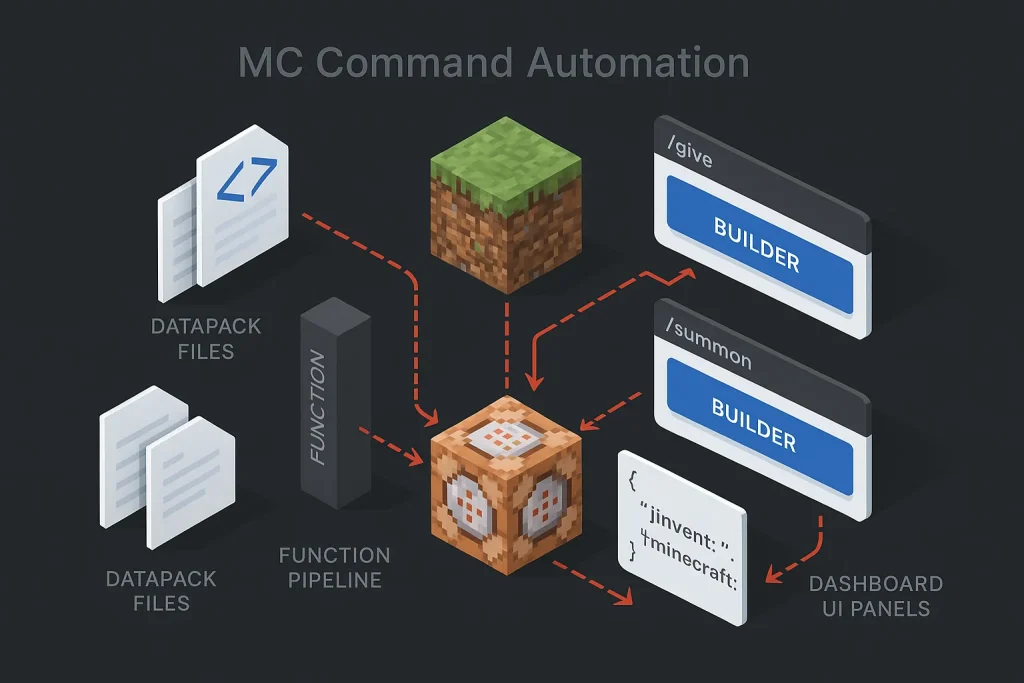
Manual command writing falls apart quickly once a Minecraft project moves beyond a single /give line. Syntax gets long. Version differences start to bite. One missing bracket can stall the whole setup. An mc command generator fixes that by turning menus, toggles, and structured fields into ready-to-run commands. That is why experienced players lean on generators to automate farms, arena logic, loot systems, and repeatable world events instead of typing every payload by hand.
At the basic level, these tools cut syntax errors. At the practical level, they change how a world is built. You stop treating commands as isolated one-off strings and start treating them as reusable building blocks: items, mobs, effects, tags, triggers, timers, and execution logic. On our view, that shift is the real upgrade. It separates a fun trick from a maintainable automation system.
Most modern generator ecosystems are fragmented by purpose, not gathered into one perfect interface. Public tool indexes such as DigMinecraft’s command generator directory show how specialized the space has become: separate builders for summon mobs, villager trades, monster spawners, fireworks, status effects, and enchanted books. We do not see that as a weakness. It reflects how many command patterns now exist across Java and Bedrock workflows.

What is an MC command generator and why automate your world?
An mc command generator is a utility that takes structured inputs and assembles valid Minecraft command syntax for you. Instead of manually composing every selector, JSON fragment, coordinate, component, or NBT-style payload, you fill in fields like item type, enchantment level, mob equipment, potion effects, block area, or custom text. The tool then outputs a command you can paste into chat, a command block, or a function file.
This matters because command complexity does not rise gently. It spikes. A short command is easy to handwrite. A custom sword with display text, attributes, enchantments, lore, unbreakable behavior, and version-specific formatting is not. The same goes for entity spawning. A basic zombie summon is trivial; a fully configured boss with effects, passengers, custom gear, tags, and behavior flags is not. That is exactly why the give command generator and summon command generator categories remain the most used utility types.
Automation also changes the cost of experimentation. When syntax stops getting in the way, you test more ideas. That directly helps map makers, server admins, minigame builders, adventure creators, and educators. A generator can shrink the gap between concept and prototype from “retype and debug for ten minutes” to “toggle options and paste once.” We have seen that pattern repeatedly: less friction usually means better iteration.
There is a second reason to automate: consistency. If you are building a world with repeated loot drops, rotating boss waves, custom villager trades, item kits, or event triggers, you need patterns. A generator lets you standardize those patterns. One convention for item naming. One for tags. One for summon payloads. One for execution timing. That makes future edits realistic instead of painful.
The strongest use case is not a flashy single command. It is a repeatable system with clear inputs and outputs. On our view, that is the same logic behind any mature automation stack: forms in, structured output out, reusable execution later.
| Generator type | Primary output | Best use case | Main risk without it |
|---|---|---|---|
| give command generator | Custom items, names, lore, attributes, enchantments | Loot tables, kits, reward items, admin tools | Broken syntax and outdated item formatting |
| summon command generator | Entities with effects, gear, tags, passengers | Bosses, encounters, scripted waves, NPC setups | Manual payload errors and selector mistakes |
| weapon command generator | Specialized custom combat items | Arena kits and role-based PvE gear | Inconsistent balancing across items |
| enchant command generator | Targeted enchant command syntax | Fast testing and item upgrades | Version mismatch and invalid levels |
The practical rule is simple: the longer and more structured the command, the more value a generator adds.
Java vs Bedrock: version support, permissions, and prerequisites
The first filter when choosing any minecraft command generator java workflow is edition support. Java and Bedrock share many concepts, but they do not share perfect syntax parity, and they do not expose the same automation layers. This is where a lot of command failures begin.
In Java Edition, data packs are a built-in automation layer that package JSON and .mcfunction files together. According to the Minecraft Wiki data pack documentation, data packs are Java-only. That makes Java better suited to structured, reusable automation that can be stored, versioned, and reloaded cleanly. On our view, this is one of Java’s biggest practical advantages for serious command work.
Bedrock supports command blocks and broader command-based setups, but it leans more heavily on those runtime mechanisms plus edition-specific behavior tooling. If you paste Java-focused output directly into Bedrock, selectors, item syntax, or payload details can fail even when the command looks almost identical. That near-match is what makes Bedrock debugging especially annoying.
Permissions are the second filter. Minecraft’s official help center states that command blocks are typically obtained via /give with operator privileges, and it documents the three main modes of command blocks: impulse, repeat, and chain. See the official Minecraft Help explanation of command blocks for the canonical behavior model. In practice, if a world or server does not grant the right privileges, even a valid command cannot be deployed safely.
Bedrock-oriented setups also depend more heavily on Creative access and operator permissions for placement, destruction, and testing. That operational difference matters. In Java, large systems can be moved into functions and tags. In Bedrock, the same logic often stays visible inside command chains for longer. We have found that this affects not just performance, but maintainability too.

A modern minecraft give command generator also has to be checked against the current item syntax model. Public tool pages such as the MinecraftMaps give generator reference explicitly highlight support for the newer Java component system, including names, lore, enchantments, and attributes. That matters because newer Java versions changed how custom item data is represented, and older NBT-only examples may no longer work without conversion.
Before building anything large, validate five prerequisites:
- Correct edition: Java or Bedrock.
- Correct game version: especially for item and entity syntax.
- Correct permissions: operator status, cheats, and placement rights.
- Correct execution target: chat, command block, function file, or data pack.
- Correct performance model: one-time trigger, repeating loop, or conditional chain.
Skip any of these and you create fake debugging work later. We see that mistake all the time.
Core commands you can automate: /give, /summon, NBT, attributes
The most common automation targets are /give and /summon because they carry the most structured data per line. A good give command generator speeds up item authoring; a good summon command generator speeds up entity authoring. That holds whether you are building a survival admin toolkit or a custom boss arena.
/give automation
The /give command is one of the easiest wins for automation because item payloads are dense. You may need to specify the target, the item, the quantity, the custom name, lore, enchantments, attributes, flags, and extra structured values. The generator handles the nested syntax so you can focus on the item design instead of punctuation.
This is where a weapon command generator becomes especially useful. Combat items often need several layered settings: attack damage modifiers, attack speed, rarity-style flavor text, effects on use, visual markers, and balancing consistency across an entire map. Writing that manually is possible. Doing it at scale is usually a waste of time.
/summon automation
The /summon command is the second major use case. A basic mob spawn is easy. A scripted entity package is not. Boss mobs, NPCs, arena waves, decorative scene entities, and invisible utility markers all benefit from generated syntax. A strong summon command generator should let you configure equipment, effects, position, passengers, tags, and additional entity data in one pass.
That matters most in event-driven maps. If a wave system depends on three groups of mobs with different tags, armor, health setups, and trigger behaviors, manual editing becomes a maintenance burden fast. Generated summon payloads reduce the chance of inconsistent formatting across those groups. On our view, consistency is the underrated benefit here, not just speed.
NBT and SNBT as the structured layer
Minecraft’s structured data model still sits at the center of advanced command work. The Minecraft Wiki documentation on NBT explains why NBT and its string form, SNBT, remain foundational for saves, entities, block entities, and command-related payloads. Even when modern item systems evolve, structured data concepts still underpin advanced automation.
For players, the practical takeaway is simple: generators are not just convenience tools. They are structured data editors with a friendlier interface. They shield you from punctuation-level mistakes inside long payloads, and that alone saves a surprising amount of time.
The chart above is not a market metric; it is an editorial complexity model that reflects how quickly syntax burden grows as you move from basic commands to always-on automation systems.
Attributes, names, lore, and modern item components
One reason players specifically search for an enchant command generator or minecraft give command generator is that custom item composition now includes more than enchantments. Modern Java item builders often need to support names, lore, attributes, and related component-based customization. Tool support for the current syntax model is not cosmetic. It is a hard selection criterion.
When evaluating outputs, check whether the generator clearly distinguishes:
- Display-facing settings such as visible name and lore.
- Mechanical settings such as attributes and enchantments.
- Version-facing syntax such as Java component formatting.
- Target-facing logic such as who receives the item and under what trigger.
If those layers are mixed together badly in the interface, the resulting commands are harder to audit. We would avoid tools that blur them.

Step-by-step: Build an automated workflow with a command generator
The right way to use a generator is not to start with syntax. Start with the outcome. Decide what should happen, when it should happen, who it should affect, and how often it should repeat. Then map that logic into commands.
A reliable workflow looks like this:
- Define the event. Example: when a player enters an arena, give a kit, spawn a wave, and start a timer.
- Break the event into units. One command for the item kit, one for the spawn payload, one for status effects, one for scoreboard or tags, one for cleanup.
- Generate each command separately. Use a minecraft give command generator for kits, a summon command generator for mobs, and any specialized utility for effects or spawners.
- Test each unit in chat first. This isolates syntax issues before they reach command blocks or functions.
- Move stable commands into automation. Put one-time setup into load logic, repeated checks into loops, and temporary actions behind conditions.
- Add names, tags, and conventions. Use consistent entity tags or naming patterns so selectors remain predictable.
- Throttle repeated logic. Anything that runs often must be justified. Fast loops should be compact and conditional.
This approach prevents the most common beginner mistake: generating a large command, pasting it directly into a repeating system, and then debugging five variables at once. On our view, modular testing is the difference between “automation” and “chaos with extra steps.”
Consider a practical example. You want a dungeon room that spawns a mini-boss once, locks the room, grants players a themed weapon, and opens the exit after the boss dies. The workflow is not one command. It is a command sequence.
First, a custom item generated through a give command generator. Second, a boss entity created by a summon command generator. Third, a trigger state stored in tags or scoreboard logic. Fourth, a repeated check for boss existence. Fifth, a cleanup and reward release action when the condition changes.
If you use functions in Java, each of those units can become a readable file instead of a wall of chained blocks. If you stay with command blocks, each unit should still be logically separated rather than packed into one unreadable contraption. We strongly prefer readability here, because future-you is always the real maintainer.
| Workflow stage | Recommended tool | Output target | Validation check |
|---|---|---|---|
| Custom loadout | minecraft give command generator | Chat or function | Item appears with correct text and stats |
| Boss spawn | summon command generator | Chat or command block | Entity spawns with gear, tags, effects |
| Loop logic | Manual function file or controlled repeat block | Tick or conditional chain | Runs only when active |
| Cleanup and reward | Targeted give/effect/setblock commands | Chain or function | Triggers once and does not loop forever |
The best command systems are modular, not just technically correct.
Scheduling with command blocks, redstone clocks, and functions
Scheduling is where Minecraft automation becomes either scalable or fragile. The documented command block model is straightforward: impulse runs on a redstone signal, repeat runs once each game tick while active, and chain runs only after the previous block succeeds. The model itself is clear. The trouble starts when players overuse repeating logic.
Because Minecraft runs at 20 ticks per second, a tick-based system can execute up to 20 times per second when left unthrottled. The Minecraft Wiki page on Java functions and the related documentation on load and tick tags explain how Java functions can be attached to automatic execution tags. That is powerful, but it also means sloppy logic turns into lag very quickly.
The scheduling hierarchy is usually this:
Best for maintainability: Java functions with organized load and tick routing.
Best for visible prototyping: command block chains with clear conditional flow.
Best for simple triggers: impulse blocks or redstone-activated events.
A common mistake is to put expensive scans in a repeating command block that never turns off. A better pattern is to keep loops conditional. For example, only run the boss-room check while a boss-room-active tag exists. Only run crop automation while a growth event or timer gate is active. Only run cleanup until the cleanup has succeeded once. We consider this one of the most important performance habits in command design.
The point of the chart is operational: repeating systems can hit 20 executions per second, so any always-on logic must be deliberately justified.

In Java Edition, functions usually beat giant visible contraptions in maintainability because they separate logic into named files. Setup logic can live in one function, recurring logic in another, and cleanup in a third. The tag order also matters, since functions in a tag execute in defined list order. That makes it possible to build a reliable sequence: initialize, run checks, then clean up.
If you are still prototyping, command blocks remain useful because they make execution order visible. But once the system grows beyond a room-sized redstone display, functions are usually easier to maintain. On our view, that is the point where “clever” should give way to “readable.”
Templates and use cases: farms, mob arenas, loot drops, world edits
Command automation becomes easier to understand when tied to concrete templates. The best templates are event-oriented and repeatable. That is what makes them reusable instead of decorative.
Farm automation
In simple farm automation, commands are often used for timed harvesting, growth checks, mob handling, or output triggers. The mistake is to scan the entire world every tick. A better pattern is bounded logic: run checks only in a defined area or only while the farm is active. If Bedrock is your target, command blocks remain central. If Java is your target, functions help consolidate the logic. We would strongly avoid global scans unless there is no better option.
Mob arenas
Arenas are a natural fit for the summon command generator. Each wave can be represented as a reusable unit with a specific entity mix, equipment package, and trigger tag. Bosses can be spawned with custom gear, then monitored until defeat. Rewards can be distributed through a separate give command generator step. This separation keeps gameplay balance independent from loop logic, which is exactly how it should be.
Loot drops and admin kits
Loot systems often rely on a minecraft give command generator because they demand consistency across multiple items. A dungeon, event chest, or admin kit works better when all items follow the same naming and attribute conventions. Instead of editing every line by hand, you can create a repeatable item design pattern and reissue it whenever the map changes.
World edits and scripted moments
Even without external modding stacks, command workflows can support room resets, scene transitions, decorative setups, particle reveals, and puzzle state changes. A single generated command may only handle one piece, but the system built around it creates the actual experience. This is why command generation is not just for technical players; it is a production aid for builders and designers. We think that point gets missed too often.

AI Minecraft command generators: prompts, limits, and safety
An ai minecraft command generator can be useful at the ideation and first-draft stage. It can translate a plain-language request into a candidate command, outline a logic chain, or suggest a function structure. That saves time when you know the result you want but do not want to assemble every selector manually.
Its limitation is reliability. Natural-language systems can produce plausible syntax that is still wrong for your exact version, edition, or execution context. They can also merge Java and Bedrock assumptions without warning. For that reason, AI-generated commands should be treated as drafts, not trusted production output. On our view, AI is best at reducing blank-page friction, not replacing validation.
The best way to use an ai minecraft command generator is as a structured assistant inside a validation loop:
- Use AI to sketch the logic and propose the command structure.
- Use a specialized generator to rebuild the exact payload.
- Check version compatibility before pasting.
- Test in a controlled world, then move to automation.
This division of labor works well because AI is good at intent translation, while dedicated generators are better at deterministic field assembly. We have seen the same pattern in SEO tooling: broad assistants are useful, but precision tools still do the heavy lifting.
Safety also matters. Never test complex automation in a world without backups. Never deploy a repeating loop you do not fully understand. Never assume a command is harmless because it is short. A small selector mistake inside a repeating system can have very large consequences.
This selection model is editorial rather than statistical, but it reflects the real order of importance when choosing between competing tools.
Debugging and performance: lag control, backups, and error fixes
Most Minecraft automation fails for ordinary reasons: wrong version, wrong edition, wrong permissions, wrong target selector, or wrong execution timing. Debugging gets easier when you reduce the system back to small testable units. That sounds basic, but in practice it solves more problems than heroic rewrites.
Start with these checks:
Syntax check: test the command in isolation.
Edition check: confirm Java vs Bedrock support.
Version check: confirm item/component or entity data format.
Permission check: confirm operator rights and world settings.
Execution check: confirm whether the command should run once, conditionally, or repeatedly.
For lag control, the rule is straightforward: always-on loops must be narrow, conditional, and purposeful. Large selectors that scan too broadly, effect applications that repeat without state checks, and block edits that fire every tick are common sources of avoidable performance cost. We would add one more blunt point: if you cannot explain why a loop must run constantly, it probably should not.
Backups are part of command engineering, not an optional afterthought. Before testing any large fill operation, mass summon system, or block replacement chain, duplicate the world. Before loading a new function set, archive the previous version. Command automation is software behavior inside a game environment; it should be treated with the same change-discipline mindset.
When a generated command fails, do not immediately rewrite everything. Compare the generator output against four variables:
- Did the tool produce syntax for the wrong version?
- Did you paste Java output into Bedrock or the reverse?
- Did a newer item component model replace the older format?
- Did the command succeed syntactically but fail logically because the target selector returned nothing?
That sequence resolves a large percentage of failures faster than random trial and error. On our view, disciplined debugging beats clever guessing every time.

From command chains to content pipelines: the Autopilot SEO analogy
Minecraft command automation and SEO automation share the same structural logic: turn manual, error-prone assembly into a repeatable pipeline. In Minecraft, a generator takes fields and outputs commands. In content operations, a platform takes a topic, semantic signals, structure, and publishing rules, then outputs a ready-to-deploy article workflow.
The analogy is useful because both systems fail in similar ways when built manually at scale. Handwritten commands become inconsistent, slow to debug, and difficult to reuse. Hand-built content pipelines can suffer from the same problems: uneven structure, missed optimization steps, weak internal linking, and delays between planning and publication.
That is why process design matters more than individual output lines. In Minecraft, the strong workflow is event definition, command generation, testing, scheduling, and deployment. In content operations, the strong workflow is topic ideation, semantic planning, content generation, optimization, linking, and publication. The pipeline mindset is identical. We think this is the most useful comparison in the whole article, because it explains why tooling matters beyond convenience.
For teams thinking beyond one-off outputs, Building Content Machines: The Ultimate Scale Guide for SEO Agencies explains the broader operational model behind scalable content systems. The strategic overlap is direct: modular inputs, standardized execution, and lower manual overhead per asset.
The same logic appears in note processing and structured drafting. If command builders reduce syntax work in Minecraft, AI-assisted input normalization reduces fragmentation in editorial workflows. A related perspective appears in From Meetings to Blog Outlines: How to Leverage AI Notes for SEO, where raw inputs are transformed into production-ready structure.
For B2B teams that need both scale and quality control, SEO Autopilot fits this pipeline model directly. It helps convert a topic into semantic planning, article structure, AI-assisted drafting, images, and WordPress publication with far less manual handling between steps. More details are available on the official SEO Autopilot site. The value is not “AI writes something.” The value is controlled throughput: less fragmentation between planning, writing, optimization, and publishing.
That distinction also matters for output quality. Automation without standards creates noise. Automation with structure creates repeatable production. The same principle applies to Minecraft functions and to content systems. If you want the output to convert, perform, and remain editable, the pipeline must be designed, not improvised. On that point, How to Write Human AI Content That Actually Converts Visitors is useful because it frames AI as an operational layer rather than a substitute for editorial control.
Choosing tools: top online MC command generators and selection criteria
There is no single universally best mc command generator because the right choice depends on edition, version, and command type. The better approach is to evaluate tools against a fixed checklist. That is less exciting than chasing “the best tool,” but usually more effective.
Start with version support. If a generator does not clearly state support for your Java version or Bedrock workflow, treat it as risky. Next, inspect command-type depth. A tool may be excellent for items but weak for entities, or strong for summon payloads but outdated for modern item components. We would never gloss over version support just because the interface looks polished.
Third, assess interface clarity. The tool should separate the layers of configuration cleanly: target, object, visual settings, mechanics, tags, and export. If a generator hides too much logic behind vague labels, you will spend more time reverse-checking the output than you save.
Fourth, evaluate output usability. Good tools produce commands that are easy to copy, test, and adapt. Great tools also expose structure clearly enough that you can learn from the result. That learning value matters more than people think, especially if you want to outgrow copy-paste workflows.
| Selection criterion | Why it matters | What to verify |
|---|---|---|
| Version compatibility | Prevents invalid syntax and outdated item formats | Java version, Bedrock support, component model |
| Feature coverage | Determines whether one tool can handle your full workflow | /give, /summon, enchantments, lore, attributes, tags |
| Interface structure | Reduces user error when configuring complex payloads | Clear field grouping and preview visibility |
| Learning value | Helps you understand the command, not just paste it | Readable output and transparent parameter handling |
The better the tool explains its own structure, the more durable your automation workflow becomes.

Quick reference: common parameters, NBT tags, and data formats
When players say a generator “works,” they usually mean one of three things: it supports the right version, it exposes the right parameters, and it outputs data in the expected format. The parameter layer is where command builders save the most time.
For item workflows, common inputs include target, item identifier, count, display name, lore, enchantments, attributes, and flags. For entity workflows, common inputs include entity type, coordinates, tags, health-related properties, equipment, passengers, and active effects. For automation workflows, common inputs include execution context, trigger timing, selector scope, and cleanup behavior.
The important distinction is between visual customization and system behavior. A glowing item name is presentation. A selector tag that tells a cleanup function which entities to remove is logic. Strong tools help you keep those concerns separate. On our view, that separation is what turns a decent builder into a dependable one.
If you are working in Java, functions and data packs add another layer of organization. Instead of storing complexity inside a long visible machine, you store it inside files and tags. That is usually the turning point from “cool command build” to “maintainable command system.”
We think the real takeaway is straightforward: the best setup is not the one with the fanciest command output, but the one you can still understand a month later. For most players, that means choosing tools with clear version support, modular workflows, and readable exports. Generators help most when they reduce both syntax errors and maintenance debt.
Looking ahead, we expect ai minecraft command generator tools to get better at first drafts, but specialized builders will still matter because version accuracy and field-level control remain non-negotiable. Java workflows will likely keep pulling ahead on maintainability thanks to functions and data packs, while Bedrock users will continue to rely more on disciplined command block design. The practical trend is clear: automation is getting easier to start, but careful validation will stay essential.
FAQ
What is the best MC command generator for Java 1.21?
The best tool is the one that clearly supports your exact Java version and modern item syntax. For Java 1.21, prioritize an mc command generator or minecraft give command generator that explicitly supports current component-based item customization, along with readable outputs for /give and /summon.
How do I use a give command generator to add custom NBT data?
Start by selecting the item, target, and visible properties, then add the advanced structured fields the generator exposes for enchantments, lore, attributes, or related data. In practice, a give command generator is easiest to use when it separates display settings from mechanics, because that makes custom data easier to validate before pasting the result into chat or a function file.
Why is my summon command not working in Bedrock Edition?
The most common reason is edition mismatch. Many summon command generator outputs are built for Java syntax, and Bedrock has different support rules, permissions, and formatting expectations. Also verify operator privileges and whether the generated entity data relies on Java-only conventions.
Can an AI Minecraft command generator create working datapacks?
It can help draft them, but it should not be treated as final output without validation. An ai minecraft command generator is useful for logic sketches and first-pass command structures, while the actual datapack should still be reviewed for Java-only file layout, function tags, version compatibility, and execution order.
How do I chain command blocks to automate farms and events?
Use impulse blocks for one-time triggers, repeat blocks for active loops, and chain blocks for dependent follow-up actions. Keep the repeated part as small as possible, add conditions so the loop only runs when needed, and move larger systems into Java functions when the chain becomes difficult to read or maintain.