
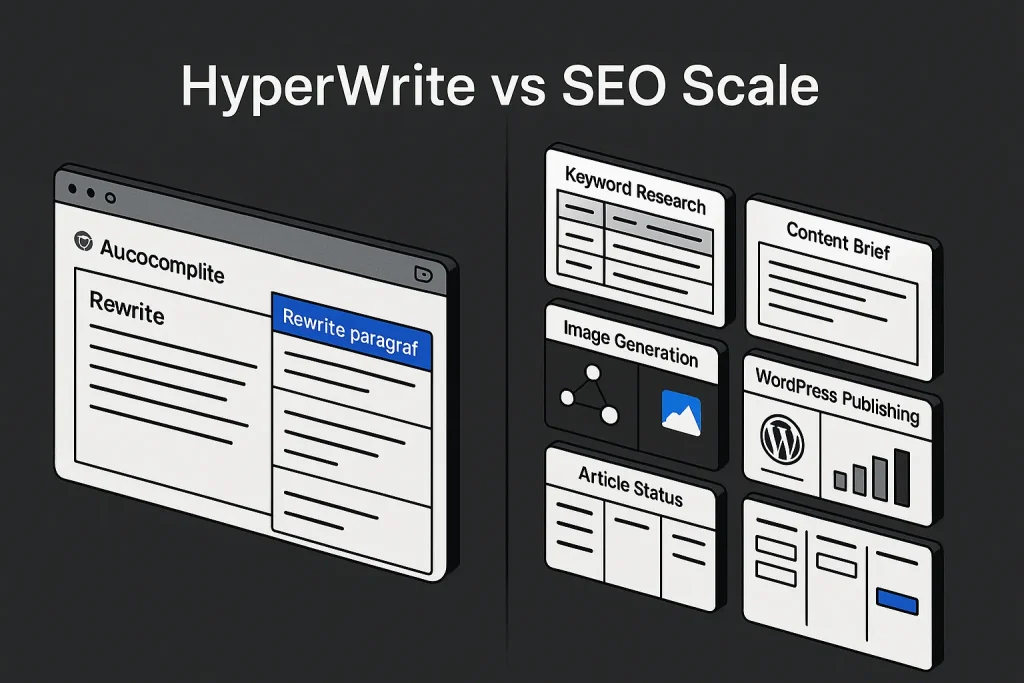
For individual writers, hyperwrite ai solves a real problem: it removes friction between a blank text field and a usable paragraph. For SEO teams, though, that promise is narrower than it looks at first glance. A browser assistant that predicts, rewrites, and edits copy can absolutely speed up local writing tasks, but scalable organic growth needs more than help inside a tab. It needs a system that handles semantics, structure, metadata, internal links, images, and publishing across the whole site.
We took this hyperwrite ai review apart from that angle. Not “is HyperWrite useful?” but “where does hyperwrite actually fit in a modern SEO workflow?” On our side, that distinction matters a lot. Plenty of AI writing tools look sharp in demos and then start leaking efficiency the moment a team moves from “fix this paragraph” to “ship 80 optimized articles without chaos.”
HyperWrite’s public positioning is fairly clear. The product revolves around a browser extension and a document editor, with broad utility across web-based writing surfaces. According to the official Chrome extension page, its primary functions are TypeAhead and an AI Writing Assistant. That already tells us what category we are in: real-time writing help, not a full content operations stack.

What Is HyperWrite AI?
HyperWrite is best understood as an AI writing assistant built for in-browser work. It is not, first and foremost, a content operations platform, CMS workflow engine, or SEO publishing pipeline. Its design is strongest at the sentence, paragraph, and draft level. That makes it relevant for emails, notes, Google Docs, ad hoc drafting, light research, and short-form content cleanup.
The positioning stays consistent across official materials. HyperWrite emphasizes “write anywhere” behavior through the extension and pairs that with an editor for guided drafting and revision. The Chrome Web Store listing says the hyperwrite chrome extension works in Gmail, Google Docs, ChatGPT, Gemini, and other browser-based text fields. That compatibility supports the core use case: stay in the workflow you already use, then apply AI help exactly where you write.
In practice, that puts hyper write ai closer to a productivity layer than a publishing layer. It helps users produce language faster, but it does not inherently decide what content should exist, how pages connect to each other, which keywords deserve priority, or how drafts move from topic selection to published URL. From an SEO standpoint, those missing layers are not minor details. They are the hard part.
The product also markets breadth through “hundreds of AI tools.” That can expand utility for individuals, and we think that part is legitimate. But a wide toolkit is still not the same as a managed content system for agencies, publishers, or multi-site brands. On our reading, hyperwriting here means versatile text help, not workflow ownership.
These numbers are useful because they show real public traction without pretending to prove enterprise SEO scale. A 4.2 rating from 117 reviews points to a legitimate product with active users. It does not, however, amount to public evidence that hyperwrite ai can run large-scale SEO production with predictable outcomes.
Test Setup: How we evaluated the Chrome extension and web editor
An SEO review of a writing assistant falls apart if it measures the wrong layer. If we judged HyperWrite only on sentence fluency, the product would look stronger than it probably is for search teams. The better test is broader: what happens when the assistant is dropped into a repeatable content workflow that has to support rankings, editorial consistency, and production throughput?
So we evaluated HyperWrite in two environments: the hyperwrite ai extension experience in Chrome and the web editor experience. The first shows how well the tool supports in-context drafting, rewrites, and predictive writing across browser tools. The second shows whether the product gives enough context retention and editing control for longer sessions.
The evaluation framework used the following dimensions:
- Task scope: sentence completion, paragraph drafting, section rewrites, outline support, and longer document handling.
- SEO relevance: ability to support headings, intent targeting, keyword coverage, metadata thinking, and internal linking preparation.
- Workflow continuity: how much context is preserved across edits, revisions, and sessions.
- Operational scale: whether the tool helps one writer write faster or helps a team publish systematically.
- Control layer: prompts, personas, source use, citations, and consistency across repeated tasks.
This is the key lens for anyone searching for a hyperwrite review with a serious SEO angle. A tool can be genuinely good and still be the wrong fit for scalable search operations. We see that mismatch all the time in SaaS content stacks.
To avoid overclaiming, we stayed anchored to official product materials and visible public information. That lets us assess positioning, plans, feature framing, and workflow implications without inventing site-wide output benchmarks that HyperWrite does not publish.

Features Deep Dive: Autocomplete, rewrite, paragraph and research tools
HyperWrite’s clearest strength is not long-form editorial architecture. It is inline acceleration. The product’s TypeAhead capability is positioned as a predictive writing layer that helps users complete thoughts faster while typing. In its June 15, 2026 article on the feature, HyperWrite describes TypeAhead as a real-time text prediction tool designed to save time for people who write all day. That is a specific promise, and on our side it is one of the product’s more convincing ones.
When a tool specializes in predictive assistance, it usually shines in repetitive communication tasks: emails, follow-ups, internal docs, meeting summaries, quick explanations, and standard business prose. In those contexts, speed matters more than full editorial planning. HyperWrite appears well aligned with that pattern.
Autocomplete and TypeAhead
TypeAhead is more than basic autocomplete. The value is contextual completion with enough semantic awareness to keep a draft moving. For someone writing dozens of messages or notes every day, that can remove a surprising amount of micro-friction. Small savings add up.
For SEO work, though, TypeAhead helps at the wrong layer if used alone. It may accelerate sentence formation, but it does not decide whether the article matches the right search intent, whether the structure reflects SERP expectations, or whether the page supports internal link architecture. It speeds up execution inside a local writing moment. It does not run the strategy. We think that distinction is where many buyers get misled.
Rewrite and paragraph tools
HyperWrite is also solid in common rewrite scenarios: rephrasing awkward sections, compressing language, shifting tone, and generating alternatives. That makes it useful for editorial polishing. If a draft already exists and the main job is to clarify or tighten it, the assistant can save real time.
This is probably where most individual users will feel the strongest daily value. Instead of prompting a generic chatbot and pasting results back into the draft, they can stay inside the existing text field. Less context switching. Less friction. Better flow.
Document editor and in-draft context
The dedicated editor pushes the product beyond extension-only behavior. On the official AI document editor page, HyperWrite says the in-editor chat has access to the current state of the draft and can apply changes directly. That matters because paragraph-level editing usually improves when the model sees more surrounding context.
In practical terms, the hyperwrite ai app experience in the editor is better suited than the extension for multi-section work, revision passes, and iterative drafting. It offers a more coherent environment for building or reshaping documents than scattered browser text boxes. Even so, it remains document-centric rather than site-centric.
Personas and tone shaping
One of the better control features is Personas. HyperWrite’s documentation explains that users can define instructions, examples, style expectations, and background information to improve consistency. According to its Personas documentation, this layer is meant to shape tone, vocabulary, and assistant behavior across repeated tasks.
That is useful for businesses that want a more stable voice. A founder could create one persona for investor-style brevity, another for customer education, and another for product documentation. In editorial terms, this reduces surface-level variance. It does not replace a content model that defines keyword clusters, article types, schema opportunities, or link targets.
For marketers comparing hyperwrite or even ai hyperwrite against SEO-native systems, this is the dividing line: Personas help the text sound consistent; they do not turn the platform into a content engine.
| Feature layer | What HyperWrite does well | What SEO teams still need elsewhere |
|---|---|---|
| TypeAhead | Speeds up inline writing and repetitive phrasing | Keyword mapping, content planning, SERP-driven structure |
| Rewrite tools | Improves tone, clarity, and phrasing at paragraph level | On-page SEO QA, metadata, internal linking, entity coverage |
| Document editor | Maintains draft context better than isolated text fields | Multi-article workflow, publishing queue, CMS automation |
| Personas | Reusable tone and behavior settings | Content cluster governance and site-wide SEO orchestration |
The pattern stays the same: HyperWrite is helpful where the work is textual and local, weaker where the work is structural and systemic. On our view, that is not a flaw so much as a category boundary.
Output Quality: Tone control, factuality, and citation reliability
HyperWrite’s output quality makes sense to judge across three layers: readability, controllability, and trustworthiness. Readability is the easy win in this category. Most modern assistants can produce fluent English. The harder question is whether the tool can preserve brand voice, stay close to factual claims, and support editorial confidence without a lot of manual repair.
On tone control, HyperWrite benefits from Personas. That gives it a more practical control surface than tools that rely only on one-off prompts. If a team member wants consistent directness, restrained phrasing, or a specific level of technical depth, the persona layer can reduce drift across outputs. For short and medium-length drafts, that is genuinely useful.
On factuality, the picture is more limited. HyperWrite’s pricing page lists “Citations + Real-Time Info” on paid access, which suggests some factual support features are available to subscribers. According to the official pricing page, those capabilities are part of the plan differentiation. That is a plus. But we would not confuse citation availability with editorial rigor. Those are very different things.
For SEO content, that distinction matters because article quality depends on more than sentence correctness. A paragraph can read well and still be strategically weak if it misses core subtopics, SERP expectations, or required comparisons. We have seen this repeatedly in AI-assisted publishing: readable copy gets mistaken for complete content.
HyperWrite performs best when the user already has a content frame and needs help executing inside it. If the team still needs topic clusters, keyword priorities, page angles, internal anchors, and publishing order, HyperWrite is not the system that closes those gaps.
Even these public numbers point to the likely fit: a real writing assistant with visible user traction, but not a publicly benchmarked SEO production platform. That is an important difference, and we think buyers should treat it seriously.

Speed and UX: Where it accelerates writing and where it slows you down
HyperWrite’s strongest UX advantage is reduced context switching. A standard chatbot workflow forces users to leave the draft, formulate a request, receive output elsewhere, then copy and adapt the result. An extension-based assistant compresses that cycle. The user stays where the work already happens.
That matters for business users who spend most of the day in browser-based tools. If the main objective is fast completion of text fragments, quick rewrites, or help inside everyday apps, the hyperwrite ai extension model is efficient.
The speed gains become less clean as scope expands. Once the task moves from paragraph repair to long-form SEO execution, the UX advantage weakens because the missing layers create new manual steps elsewhere. The user may draft faster but still has to manage the following outside the tool:
- keyword and topic selection
- content brief creation
- header hierarchy and search intent alignment
- meta title and meta description drafting
- internal link planning
- image sourcing and media metadata
- CMS formatting and publication
At that point, local speed can hide system-wide slowness. This is one of the most common traps in AI tooling. Teams see faster writing output and assume throughput improved, when in reality the bottlenecks just moved downstream into QA, formatting, optimization, and publishing.
For solo operators, that tradeoff may still be acceptable. For agencies and in-house SEO teams, it is usually more expensive than it appears. Any tool that accelerates only one production segment while leaving the rest manual tends to increase fragmentation.
Pricing and Limits: Free vs Premium plans and usage caps
Pricing is where product fit gets concrete. Hyperwrite ai pricing clearly separates casual use from heavier use. On monthly billing, the company lists Premium at $19.99 per month and Ultra at $44.99 per month. On annual billing, Premium is listed at $16 per month billed annually at $192, and Ultra at $29 per month billed annually at $348. The company frames this as a 20% savings on annual plans.
More important than the sticker price is the usage model. The Premium plan includes 250 AI messages per month, while Ultra advertises unlimited AI messages. Both paid tiers include unlimited TypeAheads. Premium includes 3 custom Personas, while Ultra includes 10. That structure tells us what HyperWrite considers the main billable constraint: generative interaction volume, not predictive typing.
For anyone searching hyperwrite ai pricing, that split is the main decision point. The lower plan can work for light drafting, ad hoc assistance, and moderate document editing. It becomes much less comfortable for professionals or teams who plan to use the assistant continuously across many production tasks.
| Plan element | Premium | Ultra | SEO implication |
|---|---|---|---|
| Monthly price | $19.99 | $44.99 | Affordable for individuals, less meaningful than workflow scope |
| Annual equivalent | $16/mo billed $192 | $29/mo billed $348 | Discount helps, but does not change product category |
| AI messages | 250/month | Unlimited | Premium cap can constrain repeated SEO drafting workflows |
| TypeAheads | Unlimited | Unlimited | Strong for daily writing speed, not for SEO orchestration |
| Personas | 3 | 10 | Useful for tone control across users or content types |
The commercial logic is coherent for a writing assistant. It is less compelling for a team that needs site-wide output, because the real budget question in SEO is not “how many prompts do we get?” but “how many optimized pages can we move from idea to publication with predictable quality?” That is a much tougher standard.
The annual discount is straightforward, but the operational takeaway matters more: pricing flexibility does not remove workflow limits. That remains true whether you call it hyperwrite ai, hyper write ai, or simply a browser writing assistant.

SEO Workflow Fit: Briefs, headings, links, images, and on‑page optimization
This is where a general writing assistant is most likely to disappoint SEO practitioners. HyperWrite can support fragments of SEO work, but it does not appear positioned as a system for orchestrating the full chain.
Consider the actual components of a scalable SEO article workflow:
- topic discovery and keyword research
- cluster logic and search intent mapping
- brief generation and heading strategy
- draft creation with topical coverage goals
- metadata creation
- internal linking suggestions
- image creation or sourcing
- WordPress formatting and publication
- repeatable QA across many URLs
HyperWrite contributes mainly in the draft creation and revision layer. That contribution is not trivial. Cleaner drafts reduce editorial labor. Better rewrites improve clarity. A good hyperwrite ai app or hyperwrite ai com app experience can also make teams more comfortable inside existing interfaces. But it is still one segment inside a much larger machine.
For teams that publish occasional blog posts, this may be enough. For teams managing content pipelines, it usually is not. The article still needs a strategy wrapper. It still needs SEO inputs before drafting and publishing outputs after drafting.
This is also where branded searches like hyperwrite ai extension, hyperwrite ai app, hyperwrite ai com app, or even hyperwrite ai com app download can mislead buyers. Access convenience is not production completeness. A smooth app or extension experience does not answer whether the platform can build internal links at scale, create image metadata, or push content directly into WordPress in a controlled way.
Teams evaluating AI content systems should read that gap carefully. The issue is not whether HyperWrite is useful. It is whether its usefulness sits at the bottleneck that actually constrains SEO growth. In many organizations, that bottleneck is not sentence drafting. It is content operations. On our side, that is the decisive point.
For a broader view of what scaled production actually requires, Building Content Machines: The Ultimate Scale Guide for SEO Agencies is a useful reference point. It frames content as an operating system, not a sequence of isolated prompts.

Can It Scale? From single paragraphs to site‑wide publishing workflows
The central question is not whether HyperWrite can generate text. It can. The real question is what happens when output targets grow from one draft to dozens or hundreds of pages. At that scale, the economics of writing tools change. The winner is no longer the tool that writes a decent paragraph fastest. It is the tool that removes manual work across the whole content lifecycle.
HyperWrite shows clear strength in paragraph-level productivity. It likely scales reasonably well for an individual knowledge worker producing lots of business writing each week. It scales less convincingly for a site owner or SEO team that needs repeatable article production tied to search demand, taxonomy logic, internal linking strategy, and publishing cadence.
The Premium plan’s 250 AI messages per month underlines this divide. For casual or moderate use, that can be enough. For systematic SEO work, especially if prompts are used for ideation, outlines, rewrites, title variants, metadata, and cleanup, that ceiling can become restrictive. Ultra removes the cap, but unlimited messages still do not create autonomous workflow capability.
The visual pattern is simple: HyperWrite is strongest where text is being formed or revised, and weaker where SEO requires structured automation around that text.
That also explains why free-tier curiosity around hyperwrite free, hyperwrite free ai writing, or hyperwrite ai free often leads to mismatched expectations. Users may hope the tool will solve the whole content pipeline, when in reality it mainly accelerates one writing layer. The mismatch becomes obvious as content volume rises.
Quality control is another scaling constraint. SEO output at scale requires consistency across title logic, subtopic coverage, linking standards, formatting, and factual review. Teams that rely on manual assembly of these parts create hidden labor. If one tool drafts, another optimizes, another checks tone, another handles CMS formatting, and humans still stitch the pipeline together, scale remains fragile.
That is why content teams increasingly compare writing assistants not only by output quality but by workflow compression. A tool that is slightly less elegant at paragraph phrasing can outperform a better writer if it removes five manual steps downstream. On our experience, that tradeoff matters more than most product demos admit.
On the quality side, teams should also account for review and detection workflows. How an AI Writing Checker Can Save Your Brand’s Reputation is relevant here because scaling content without review standards increases editorial risk even when the drafting tool is competent.

HyperWrite vs Autopilot SEO: Browser assistant vs autonomous publishing suite
This comparison is where category clarity matters most. HyperWrite and SEO Autopilot are not direct substitutes in the narrow sense of “which one writes text.” They solve different scopes of work.
HyperWrite is a browser assistant. Its core value is helping users write in the places they already work. It supports drafting, rewriting, predictive completion, and tone shaping. That makes it attractive for individuals and small teams whose main problem is local writing speed.
SEO Autopilot is built for autonomous SEO content production. The emphasis is not just text generation, but the full route from keyword and semantic planning to structure, images, internal links, and WordPress publication. Put simply, one product assists a writer; the other runs a content workflow. We think that distinction is the fairest way to compare them.
| Dimension | HyperWrite | SEO Autopilot |
|---|---|---|
| Core role | Browser-based AI writing assistant | Autonomous SEO publishing suite |
| Best for | Inline drafting, rewrites, everyday text work | Scaling article production for sites and marketing teams |
| SEO workflow depth | Partial, mainly drafting support | End-to-end: semantics, structure, text, images, publishing |
| Publishing layer | Not positioned as direct WordPress autopublisher | Built for automated WordPress publication workflows |
| Operational outcome | Faster writing moments | Compressed content operations across the whole site |
The buying decision is therefore fairly straightforward. If the problem is “I write all day and want better assistance in-browser,” HyperWrite is a sensible candidate. If the problem is “I need to scale SEO content from topic idea to published article,” HyperWrite is the wrong category.
Teams trying to close the gap between AI writing and business outcomes should also study content quality, conversion, and naturalness. How to Write Human AI Content That Actually Converts Visitors is especially relevant because content that scales still has to remain readable and commercially useful.
For organizations where output volume matters, SEO Autopilot is simply better aligned with the workload. The platform at SEO Autopilot is built for automated SEO article creation under a single operational model: semantic inputs, structure generation, content drafting, image handling, internal linking, and WordPress publication. That is a business process tool, not just a writing interface. The gap becomes significant once content production turns into recurring infrastructure rather than occasional support work.

Verdict and Recommendations: Who HyperWrite is for—and when to choose an SEO content machine
HyperWrite is a credible writing assistant with a clear product identity. It is not pretending to be an enterprise SEO engine, and we do not think it should be judged as one. Its main strengths are inline assistance, browser convenience, rewrite support, and tone shaping through Personas. For freelancers, operators, founders, students, and professionals who live in browser-based text fields, those strengths are practical. Even use cases like a quick hyperwrite essay draft or business writing cleanup fit naturally here.
Its limitations appear when the success metric shifts from “write faster” to “publish at scale with SEO discipline.” HyperWrite does not appear designed to own keyword planning, cluster logic, internal linking, image workflows, or WordPress publication as one unified process. That makes it useful within a content workflow, but insufficient as the workflow itself.
A concise recommendation framework looks like this:
- Choose HyperWrite if you need a flexible AI helper for everyday writing, paragraph rewrites, and browser-based drafting across many tools.
- Choose HyperWrite Ultra over Premium if you expect heavy daily AI interaction and want to avoid the 250-message ceiling.
- Do not choose HyperWrite as your primary SEO system if you need briefs, metadata, internal links, scalable editorial consistency, and direct publishing infrastructure.
- Choose an SEO content machine if the business goal is repeatable site-wide output rather than isolated writing assistance.
This also explains why users searching for hyperwrite login, hyperwrite ai login, hyper write ai com, or hyperwrite ai com app download may arrive with very different expectations. Access intent says almost nothing about workflow fit. The right evaluation starts with the job to be done, not the convenience of the entry point. If someone is mainly looking for the hyperwrite ai com app or a smooth hyperwrite ai login flow, that still does not answer the bigger SEO question.
For teams relying on free tools, there is an extra caution here. Cost-saving at the writing layer can create quality risk at the SEO layer if teams start publishing weakly structured AI copy without proper oversight. Why Using an AI Writer Free Platform Can Lead to Google Penalties is worth reading because the real issue is not free AI itself, but the absence of a disciplined system around it.
The final verdict is simple. HyperWrite is a good writing tool. It is not a scalable SEO publishing machine. If your priority is faster text inside the browser, it deserves consideration. If your priority is content operations across an entire site, the better choice is a platform built for autonomous SEO execution rather than local drafting convenience.
We think the practical takeaway is clear: HyperWrite works best as a writing layer, not as a publishing system. For individuals, that can be enough. For SEO teams, it usually is not. The strongest results in search still come from tools that reduce operational drag across planning, production, QA, and publishing—not just sentence creation.
Looking ahead, we expect more products in this category to add research, citation, and workflow features. But the market is also splitting in two. One lane is getting better at helping people write; the other is getting better at replacing manual content operations. On our view, HyperWrite belongs firmly in the first lane for now.
FAQ
Is HyperWrite free and what are the limits?
HyperWrite has paid plans with clear usage differences, and hyperwrite free access is not the main value tier described in its public pricing. The limit that matters most for SEO users is simple: Premium includes 250 AI messages per month, while Ultra offers unlimited AI messages. Both paid tiers include unlimited TypeAheads, so hyperwrite ai free curiosity makes sense, but the serious utility sits in the paid plans.
Does HyperWrite have a Chrome extension and how does it work?
Yes, HyperWrite has a Chrome extension. In fact, the hyperwrite chrome extension is central to the product’s positioning. It focuses on TypeAhead and an AI Writing Assistant that works inside browser-based text fields such as Gmail, Google Docs, ChatGPT, and Gemini, which makes the hyperwrite ai extension strong for inline drafting and rewrites.
Is HyperWrite good for SEO content at scale?
It is good for writing assistance, but not ideal for SEO content at scale. HyperWrite helps generate and refine paragraphs, yet it is not positioned as a full system for semantic planning, internal linking, image handling, metadata, and automated publishing across many pages. That is the short version of our hyperwrite ai review.
Can HyperWrite publish directly to WordPress or create internal links?
Based on the official public materials referenced in this review, HyperWrite is not positioned as a direct WordPress autopublishing platform or an internal linking engine. SEO teams would still need separate tooling or manual processes for those steps, whether they use hyperwrite ai app, hyperwrite ai com app, or the browser extension.
How does HyperWrite pricing compare to other AI writing tools?
Hyperwrite ai pricing is competitive for an AI writing assistant, especially for users who value browser-based workflows. The more important comparison is not price alone, but scope: HyperWrite sells writing acceleration, while SEO-focused SaaS platforms justify pricing through broader automation of the entire publishing process.